How to make AI UGC ads that look real
The short answer
An AI UGC ad works when nobody can tell it was made. The viewer has to believe a real customer filmed it on their phone. Here is how to make one, in 5 steps:
- Write the script the way your buyer talks, with their doubt in it.
- Make a creator who looks like your buyer, in a real room, shot like a phone.
- Make the talking clips with your product in their hands from the first second.
- Edit it like real UGC: a late first cut, small plain captions or none, no music.
- Make 5 hooks for the same body and test them.
Bring your own KIE key. You pay KIE directly for what you make, with no markup.
What do winning UGC ads have in common?
UGC means user generated content: ads that look like a real customer filmed them on a phone.
When we built the UGC editing style in Create Studio, we broke down 44 winning UGC ads from my swipe folder, shot by shot. 34 of them were true UGC: one real looking person filming themselves. Here is what they share:
| What they do | How many of the 34 |
|---|---|
| First words in the first 1.5 seconds, no intro, no logo | 32 |
| Product in the frame at the very first second | 19 |
| Brand name never said out loud at all | 10 |
| No music under the voice | 18 |
| An end card, a closing screen with the logo | 1 |
From the breakdown behind Create Studio's UGC style. The median is the middle ad when you line them all up. The brand, when it is said, comes a median of 19% of the way into the ad. The people talk fast, a median of 206 words a minute.
The pattern is simple. The ad never looks made. The product is right there, but the person talks about their problem first and the brand comes late.
Step 1: Write the script the way your buyer talks
The hook is the first line of your ad, the part that stops someone from scrolling. These were the most common hooks in those 34 ads, in order:
The most common hooks in 34 winning UGC ads
- Call out who it's for (7 ads). The first line names the buyer before the product, so the viewer feels picked out of the feed.
- Show the problem up close (6 ads). The gross or worrying picture fills the frame and the viewer checks their own body.
- A live demo (5 ads). "Watch this," then the product working, with the silence left in.
- Say the doubt first (4 ads). The creator says the buyer's objection before the buyer can, like the price being too high.
- Reply to a comment (3 ads). It opens on a comment bubble, like a real TikTok reply.
After the hook, the winners follow the same order:
The order of a winning UGC script, after the hook
- The doubt.
- The problem in their own words.
- A reason it was never the buyer's fault.
- The product in hand.
- Proof from their own life.
- A soft "I'll leave a link below" with a reason to hurry.
One honest note: Create Studio doesn't write your script. The script is still on you, and it matters more than any model.
Step 2: Make a creator who looks like your buyer
Every winner is shot like a phone at arm's length or on a tripod. It's in the person's own kitchen, bedroom or car, in whatever light was there.
The casting is the buyer, not a model. A glossy, perfect face breaks the whole thing.
A start frame is the first picture of a clip, the one the video model brings to life. So make your creator's start frame look like a phone photo, not a studio shot. In Create Studio's Image tab, the Native style is made for this.
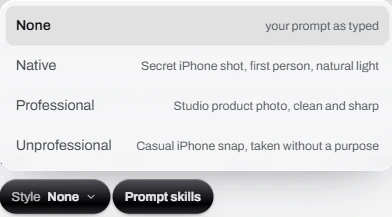
Add your real product photo as a reference image, so the product in their hands is yours.
Step 3: Make the talking clips
Turn each start frame into a short talking clip with a video model, one clip per few lines of the script.
Keep the product in frame from the start in a demo, try on or doubt hook. In a story or a "here's why" hook it can wait.
This was the slowest part when I did it by hand. I would sit and paste prompts into a video model for 2 hours straight for one batch. That's why Create Studio has your AI agent write every prompt and make the whole batch, named and in order.
It doesn't have to cost much. KIE is the site that sells the AI models, and you pay it only for what you make. On Gemini Omni Flash 1.1, the default video model in Create Studio, an 8 second clip at 1080p is 105 KIE credits, about $0.53.

A 40 second ad made of 5 clips is about $2.63.
Step 4: Edit it like real UGC
This is where most AI UGC gives itself away. It gets edited like an ad. The winners do the opposite:
- Cut late. In the single take ads, the first hard cut comes a median of 7.9 seconds in. The first thing to change on screen is often the hook text coming off, not a cut.
- Small plain captions, or none. About half of the real footage winners have no captions at all. The rest mostly use small white subtitles like TikTok's own, not big bold words.
- No music. A quiet room sounds like a real recording.
- Keep the real stuff. Slips, asides and a silence while the product works all make it feel real. Don't cut them.
One thing is different for AI footage. The 3 AI made ads in the 34 got away with it by copying real settings, a mirror selfie, a car seatbelt, a kitchen, and all 3 used running captions.
So with AI clips, I think you should keep small captions on.
In Create Studio, you put your clips in Video Editing, pick the UGC style, and your AI cuts the dead space, adds the captions and the hook text and gives you the finished ad. If something is off, hit Re-edit and write a note.
Step 5: Make 5 hooks and test them
When I made ads by hand, a batch of 5 took me from about 10 am to 11 pm. The only thing that changed between them was the first sentence.
That's the part worth testing, so make it cheap. Write 5 hooks, keep the same body, and let the ads tell you which one wins.
In Create Studio your AI agent makes the whole batch of hooks and bodies at once. An ad set is a group of ads on Facebook and Instagram that share one budget. The Ad Uploader puts up to 50 ads into your Meta ad sets in one go.
If you are weighing other AI video apps for this, I compare them in Higgsfield alternatives for ecommerce video ads.
What makes AI UGC look fake?
- A perfect face in perfect light. Real UGC has real skin and a messy room.
- The brand name as the first line. In a problem hook, the winners hold it back.
- Big bouncing captions and a music bed on a selfie ad.
- A logo or intro at the start. None of the 34 winners had one.
- An end card. Only 1 of the 34 used one.
Questions people ask
Can AI UGC ads look real?
Yes, if they copy real UGC. The 3 AI made ads among the 34 winning UGC ads got away with it by copying real settings, a mirror selfie, a car seatbelt, a kitchen, and all 3 used running captions.
How much does it cost to make an AI UGC ad?
On Gemini Omni Flash 1.1, the default video model in Create Studio, an 8 second clip at 1080p is 105 KIE credits, about $0.53. A 40 second ad made of 5 clips is about $2.63.
Should a UGC ad have music?
Most winners don't need it. 18 of the 34 winning UGC ads had no music under the voice. A quiet room sounds like a real recording.
How many hooks should I test?
Write 5 hooks, keep the same body, and let the ads tell you which one wins. The first sentence is the part worth testing.
Starter is $29.95 a month for 40 finished ads, after 3 free days. New to KIE? Here is how to get your KIE key.
More guides: Higgsfield pricing: what one ad really costs · Higgsfield alternatives for ecommerce video ads · Is Higgsfield worth it? · The best AI video ad generators for ecommerce
Sources
Checked November 23, 2026. I recheck this page every 90 days.
- The numbers about winning UGC ads come from the shot by shot breakdown of 44 ads behind Create Studio's UGC editing style, done in 2026.
- Clip prices are from Create Studio's model list, at KIE's price of about $0.005 a credit (KIE pricing).
- Create Studio's plans and features are from the Create Studio home page, November 23, 2026.